🎮 Supported Controllers for ClearView
Supported Input Methods:
- Keyboard: Use your PC keyboard for basic control.
- Any Windows Game Pad: Any standard USB gamepad (joystick) recognized by Windows is supported.
- USB Cable for RC Transmitter: Connect your actual RC transmitter to your PC using a special USB adapter cable for the most realistic experience.
Recommended USB Simulator Controller
For best results and hassle-free setup, we recommend using a dedicated USB simulator controller that works seamlessly with ClearView in all modern Windows versions.
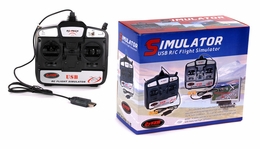
Using Your Own Radio Transmitter
If you prefer to use your real RC radio transmitter (which is ideal for muscle memory training), you will need a special USB simulator cable.
You can find compatible USB cables, for example, by searching on Amazon:
Search for USB Simulator Cables on Amazon